Improving Text Editing in U-Boot’s Expo: Multiline Support and Cursor Independence
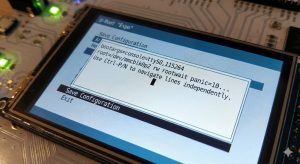
As the “Expo” menu system in U-Boot continues to mature, we are moving beyond simple menu selections and into more complex user interaction. One area needing significant attention is text input—specifically, how we handle multi-line text editing and the underlying video console cursor.
In a new 16-patch series, we overhaul the textedit object to support proper multiline editing and fundamentally change how we manage video console contexts.
The Cursor Conflict
Currently, the video console (vidconsole) operates with a single shared context for the cursor state. This works fine for a simple command line, but it becomes problematic when rendering complex UIs. If an Expo object needs to blink a cursor or accept input, it fights for control over the global cursor state. We typically have to rely on a clumsy save/restore mechanism (vidconsole_entry_save) to backup the console state before rendering a menu and restore it afterwards.
This series introduces independent vidconsole contexts.
Now, text-input objects (like textline and textedit) have their own dedicated vidconsole context. They maintain their own cursor position and state, completely independent of the main console or other objects. This allows us to delete the old entry_save and entry_restore mechanisms entirely, resulting in a nice cleanup of the video console drivers.
Multiline Navigation (Ctrl-P / Ctrl-N)
Editing text that spans multiple lines requires more than just moving forward and backward in a character buffer. Users expect to move visually up and down lines while maintaining their horizontal position—standard behaviour in any modern text editor.
We add support for visual line navigation using Ctrl-P (Previous line) and Ctrl-N (Next line).
Implementing this requires some interesting logic. Because the text wraps automatically based on the width of the container, “up” doesn’t mean “back 80 characters.” The implementation uses text measurement to calculate the pixel geometry of the wrapping. When a user moves up or down, we calculate the horizontal pixel offset of the current cursor, find the corresponding visual line, and place the cursor at the character index that matches that pixel alignment.
Key Changes Summary
- Independent Contexts: We add
vidconsole_ctxto decouple cursor state for different objects. - Cleanup: We remove
vidconsole_entry_save/restoreops fromconsole_normalandconsole_truetype. - Navigation: We add logic to
cread_line_process_chand Expo to handle visual line jumping. - Testing: We include tests in
test/boot/expo.ccovering keypress handling (Ctrl-B, Ctrl-F, Ctrl-W, etc.) and open/close cycles to ensure the display restores correctly.
This update paves the way for more sophisticated configuration screens within U-Boot, allowing users to edit longer configuration strings, scripts, or certificates directly from the bootloader UI.