Codman Gets Categories: Analyze Your U-Boot Build by Functional Area
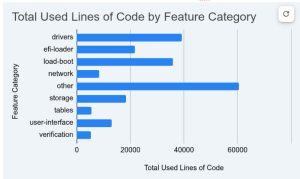
U-Boot’s codman tool helps developers understand which source files and lines of code are actually compiled into a build. With the latest update, codman gains a powerful new capability: categorising source files by functional area and exporting analysis results to CSV for spreadsheet analysis.
The Challenge
U-Boot is a massive codebase with over 45,000 source files. When you build for a specific board, only a fraction of these files are compiled. But which fraction? And how does that code break down by function – how much is boot code, how much is driver code, how much is networking?
Previously, codman could tell you which files were used and show directory breakdowns, but there was no way to group files by their purpose. The new category system solves this.
Introducing Categories and Features
The category system uses a simple TOML configuration file (tools/codman/category.cfg) to define functional groupings:
[categories.load-boot]
description = "Loading & Boot"

[features.driver-model]
category = "drivers"
description = "Driver abstraction/model"
files = [
    "drivers/core/device-remove.c",
    "drivers/core/device.c",
    "drivers/core/dump.c",
   ...
]

[features.boot-linux-direct]
category = "load-boot"
description = "Boot Linux directly"
files = [
    "boot/bootm.c",
    "boot/bootm_final.c",
    "boot/bootm_os.c",
    "boot/bootmeth-uclass.c",
    "boot/bootmeth_cros.c",
    "boot/bootmeth_efi.c",
    "boot/bootmeth_efi_mgr.c",
    "boot/bootmeth_extlinux.c",
...
]
Files can be matched using:
- Exact paths:
"boot/bootm.c" - Glob patterns:
"drivers/video/*.c" - Directory prefixes:
"lib/efi_loader/"(matches all files under the directory)
CSV Export for Spreadsheet Analysis
The new --csv option exports analysis results in a format ready for spreadsheet import:
codman -b qemu-x86 dirs -sf --csv report.csv
This produces output like:
Type,Path,Category,Feature,Files,Used,%Used,%Code,Lines,Used
dir,arch/x86/cpu,,,20,15,75,85,3816,3227
file,arch/x86/cpu/cpu.c,load-boot,boot-x86-bare,,,,88,399,353
file,arch/x86/cpu/irq.c,load-boot,boot-x86-bare,,,,100,366,366
...
For simpler output with just file data, use -F (files-only):
codman -b qemu-x86 dirs -sf --csv report.csv -F
Path,Category,Feature,%Code,Lines,Used
arch/x86/cpu/cpu.c,load-boot,boot-x86-bare,88,399,353
arch/x86/cpu/irq.c,load-boot,boot-x86-bare,100,366,366
...
Practical Applications
Understanding Build Composition
Import the CSV into a spreadsheet and create a pivot table by category to see how your build breaks down:
| Category | Files | Lines | % of Total |
|---|---|---|---|
| load-boot | 145 | 52K | 21% |
| drivers | 203 | 89K | 36% |
| filesystem | 67 | 31K | 13% |
| … |
Tracking Code Growth
Generate CSV reports over time to track how different functional areas grow or shrink as features are added or removed.
Identifying Uncategorised Files
Use -u to list files that don’t match any category:
codman -b qemu-x86 dirs -sf --csv report.csv -Fu
This helps identify gaps in your category configuration.
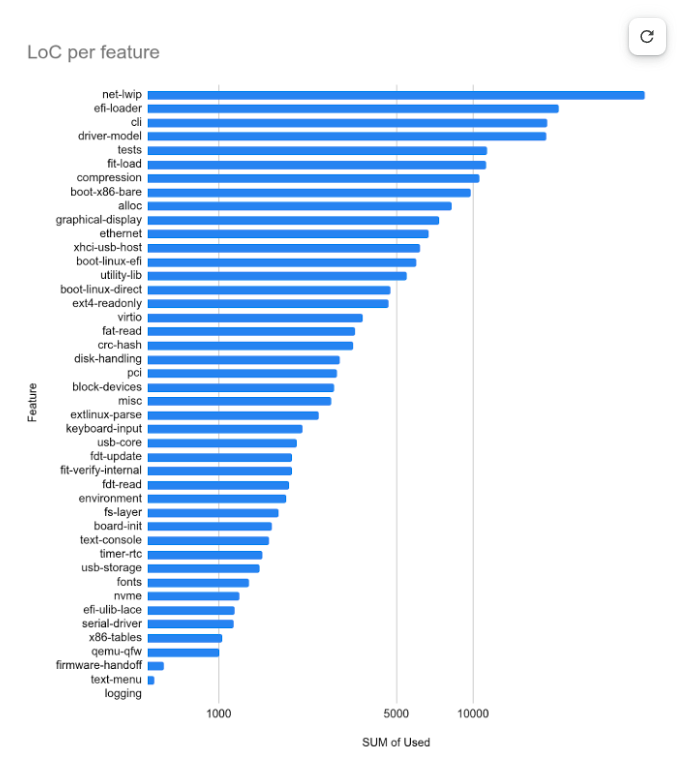
Creating graphs
Import the CSV into your favourite spreadsheet program and you can quickly create a useful graph:
Excluding External Code
External or vendored code can be excluded from reports using the [ignore] section:
[ignore]
files = [
    "lib/lwip/lwip/",    # External lwIP library
]
Ignored files are completely omitted from CSV output, keeping reports focused on code you maintain.
Getting Started
- Build your board as usual:
codman -b <board> dirs -sf --csv report.csv -F - Check for unmatched files:
codman -b <board> dirs -sf -u - Edit
tools/codman/category.cfgto add patterns for unmatched files - Regenerate the report and import into your favourite spreadsheet
What’s Next
The category system currently powers CSV output. Future work may extend categories to HTML reports and terminal output, enabling consistent functional-area analysis across all output formats.
We welcome contributions to expand category.cfg with better coverage of U-Boot’s functional areas. The goal is to have every source file mapped to a meaningful category, making it easy for anyone to understand what goes into a U-Boot build.