An update on mouse support

Over the last few months (and since the last post) the mouse support in U-Boot Concept has matured quite a bit. The various performance improvements have had a big impact and the UI is now smooth and useable. Here’s a video:

So what’s next? Let’s look at a few topics.

Touchpads

So far touchpads are only supported in the EFI app, assuming that the underlying firmware enables this. On real hardware, such as the Qualcomm x1e laptops, this seems to work OK.

Support on other platforms requires a driver. The USB mouse driver (CONFIG_USB_MOUSE) might work, or it might not. If the touchpad is attached via I2C or SPI, then a different driver would be needed, perhaps with a special protocol for the device.

EFI app

So how do you the mouse or touchpad running on the EFI app? Just make sure that CONFIG_EFI_MOUSE is enabled when you build the U-Boot app, and all should be well.

Unfortunately the widely used ‘ovmf’ Debian package does not enable the mouse, or at least not properly. This is used for running EFI apps under QEMU. U-Boot’s build-efi script passes the required arguments, but this is not enough.

If you would like to build a version of EDK2 which supports the mouse / touchpad, it is quite simple. Just change these two files.

First, in OvmfPkg/Include/Dsc/UsbComponents.dsc.inc add this line, e.g. between UsbKbDxe and UsbMassStorageDxe so that it builds the mouse driver:

  MdeModulePkg/Bus/Usb/UsbMouseDxe/UsbMouseDxe.inf

Second, in OvmfPkg/OvmfPkgX64.fdf add this line, e.g. between UsbKbDxe and UsbMassStorageDxe so that the driver ends up in the firmware volume:

INF  MdeModulePkg/Bus/Usb/UsbMouseDxe/UsbMouseDxe.inf

Clicking in more places

So far, clicking in a lineedit object just places the cursor at the end of that object. Really it should set the cursor to the clicked position. This will become more important when the test editor is finished, since there may be a lot of text on the screen.

This is fairly simple to implement and should appear early in the new year.

Selecting text

A more ambitious feature would be text selection, where the mouse can be used to select part of a lineedit. This would need to be done as part of a copy/paste feature. It would make the text editor a little more functional, but it is not really core feature. If you are interested in implementing that, send an email to the U-Boot Concept mailing list!


A New Key in U-Boot: Introducing Support for the Tillitis TKey

A new patch series has landed in U-Boot concept, adding foundational support for the Tillitis TKey, an open-source USB security token. This series lays the groundwork for integrating hardware-backed security operations directly within the bootloader.

The TKey is an interesting piece of hardware. It’s a small, programmable USB device that contains a unique, internal secret key. When you plug it in, it starts in a firmware mode, ready to receive a small application. Once the application is loaded, the TKey transitions to an “app mode” where it can perform cryptographic tasks, like deriving keys, without ever exposing its core secret. When the key is removed, the application is erased, along with all data.

This initial 8-patch series introduces the necessary components to get started with the TKey in U-Boot.


What’s Included?

The support is built around a new tkey uclass, providing a standard driver model interface for communicating with the device. The series includes several key pieces:

  • A New tkey Command: A simple command-line tool to interact with the device. You can get device info, load applications, and derive keys.
  • Signer App Firmware: The series includes the binary for the standard “signer” application. This is the code that gets loaded onto the TKey to perform key derivation. You can build this yourself if you like, but for now U-Boot uses the vendor-provide version (see Tellitis TKey Signer).
  • User-Supplied Secret (USS) Derivation: To support the TKey’s key derivation mechanism, support for the blake2s hashing algorithm has been added. The TKey uses this to combine its internal secret with a user-provided password (the USS).
  • Sandbox Emulator and Driver: For development and testing, a full TKey emulator is included for the sandbox environment. Additionally, a sandbox driver that can talk to a real TKey over a serial port (/dev/ttyACM0) is provided, making it easy to test with actual hardware from a development machine.

How It Works: A Quick Example

The main goal of this feature is to derive a secret key that can be used for other purposes, like unlocking an encrypted disk. The workflow is straightforward. Using the new tkey command, you can provide a password (a “User-Supplied Secret” or USS):

Bash

=> tkey connect
Connected to TKey device
=> tkey getkey my-secret
Public Key: 505152535455565758595a5b5c5d5e5f505152535455565758595a5b5c5d5e5f
Disk Key: 228b2f6abf8be05649b2417586150bbf3e1b3f669afa1c6151ddc72957933c21
Verification Hash: a72a46b8f8c7ff0824416ada886f62b6c2808896d71201a32814ab432c7a81cf
=> 

The TKey loads the signer app using the USS, combines its internal secret with your password, and generates a unique public key. From this, a deterministic Disk Key is derived using a hash function. Because the TKey’s internal secret is unique and stable, the same password will always produce the same disk key on the same TKey, but a different key on any other TKey.

The command also outputs a Verification Hash. This can be stored and used later to check if a password is correct without having to perform a full decryption operation.


What’s Next?

This patch series provides the basic building blocks. It’s a first step toward more advanced and interesting security features. We’re looking forward to seeing how the community builds on this foundation, with potential integrations into secure boot flows, disk encryption unlocking with LUKS, and other security-sensitive operations.


The RISC OS mouse pointer

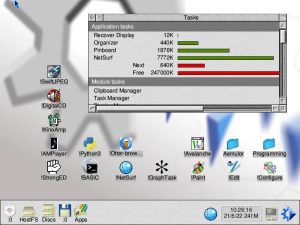
My first ARM machine was an Archimedes way back in about 1987. I received the first unit sold in New Zealand. At some point my machine started running Acorn’s RISC OS. For me, some of the amazing things about RISC OS were anti-aliased outline fonts, a string-sound generator which worked without a data table and a really nice mouse pointer. There is a fairly recent article on The Register which talks about how it came to be.

Anyway, for U-Boot I’ve chosen to use this same pointer for the mouse. It has good contrast and has a cheerful colour schema. Of course you can change it if you like, but see what you think!


Some thoughts on Claude

I’ve been experimenting with AI coding tools, mostly Claude, for the last few months. Here are some thoughts on my experience so far.

Things I have tried

So far I have tried using Claude for many different tasks:

  • Solving a coding problem, such as creating a Python script to scan header files
  • Writing tests for existing code
  • Checking patches before I send them
  • Writing drafts for blog posts
  • Figuring out bugs
  • Adjusting code to make tests pass

First, a caveat. I am a beginner at using this technology and do not spend much time following leaders in this space. I started using Claude based on a family recommendation and am far from being any sort of expert.

The good

When I first tried out creating a new command in Claude, it produced code which compiled and looked like U-Boot code. This seemed quite magical to me and i left the computer with a feeling of awe and bewilderment. I have a basic understanding of how AI operates but it is amazing to see it producing code like this. Also the inference is very fast, sometimes producing hundreds of lines of code in a minute or less.

Claude works within your project directory. It can read and write commits, run tests, etc. For a code base like U-Boot with lots of tests, it is relatively easy to get it to make changes while ensuring that the tests still pass. It can execute most commands that you can. It asks first but you can add rules to a JSON file to give it permission to run things itself.

In most cases, Claude is able to solve the problem. For example, I wanted to build U-Boot as a library. I actually had some old patches for this, but I decided to give the task to Claude. I provided a lot of guidance on exactly how it should work, but Claude figured out the Makefile rules, iterating until things worked and fixing bugs that I found. I was able to make changes myself, tell Claude and it would build on them.

The easiest tasks for Claude are to extend an existing feature and the associated tests. The hardest are to refactor code in non-trivial ways.

One interesting case where Claude does well is dealing with conflicts when rebasing a series or applying patches. I have only tried this a few times but it has not made any mistakes yet. It is fairly slow, though.

The bad

Claude is a long way from perfect. It feels to me like a very junior but knowledgeable software engineer. It happily writes 600 lines of code when 300 would do. For larger tasks, the code feels extremely ‘flabby’ and a bit painful to read. Variables names are too long. Useless comments are added to obvious code. It happily creates highly redundant code instead of setting up a helper function first.

But with all of these problems, you can guide it to perform better. You can review the code and ask it to make changes and it happily does so. It might not be able to conceive of a refactoring that would improve code, but it can execute it.

For one tasks, Claude was able to create a 1200-line Python script in about an hour (with lots of prompting, etc.) that would have likely taken me 1-2 days (it is hard to be sure, since I didn’t do it). I then spent about 6 hours refacoring and rewriting the script after which I felt that the code wasn’t too bad. The end result was likely not as good as I would have done if I had written it myself from scratch, but it was fine.

Sometimes Claude gets stuck. It tends to happen when I am trying to get it to do something I’m not to sure about. It sometimes just gets the wrong end of the stick, or solves a slightly different problem. This is most common when first firing it up. After a bit of back and forth it settles in and makes progress

The ugly

What is Claude bad at? When running programs it can see the console output, but it cannot interact with the program, or at least I’m not sure how to make it do that. So for example it can run U-Boot sandbox with a timeout and it can even pass it commands to run. But it doesn’t know how to ‘type’ commands interactively.

Claude can sometimes change the test to fit the code, when the tasks was to fix the code. It tends to write non-deterministic tests, such as asserting that an integer is greater than zero, rather than checking for an exact value.

Claude can produce commit messages. It tends to be verbose by default but you can ask it to be brief. But I have not had much success in getting Claude to create its own commits after making a whole lot of changes.

Getting things done can sometimes just be very slow. I have not really compared the time to create high-quality, finished patches myself versus with Claude. That is something I must try, now that I am learning more about it.

My workflow

How do I actually use Claude? Well, first I figure out a design for what I want to do, typically a diagram or some notes. Then I ask Claude to perform an initial change to make a start. Then I build on that piece by piece until I have something working. I have not tried giving it a large challenge.

In some cases I create commits as I go, or even ask Claude to do this, but mostly I just create the whole thing and then manually build the commits afterwards. For code that Claude created in whole or part I add a Co-developed-by tag.

Breaking things into chunks saves time, I think. Cleaning up hundreds of lines of AI-generated code is very time-consuming and tedious. It is easier to tweak it a bit as I go.

A note on Gemini

I have tried Gemini CLI and sadly so far it has not been useful except in a few small areas. It is quite slow and seems to go into the weeds with any sort of moderate challenge. I expect this to change rapidly, so I keep trying it every now and then. I also use Gemini to create most of the featured images.

I have not tried OpenAI so far.

What do you think?

Leave a message in the comments if you have any thoughts or suggestions!


U-Boot as a Library: Introducing ulib – A Bridge to the Future of Firmware

The world of firmware development is evolving rapidly. Modern SoCs are increasingly complex, boot protocols are multiplying, and new programming languages like Rust and Zig are gaining traction in systems programming. Meanwhile, U-Boot has accumulated over two decades of battle-tested functionality supporting 1300+ boards, a comprehensive driver model, extensive filesystem support, and a wealth of boot protocols.

What if we could make all this U-Boot functionality available to new projects without requiring them to rebuild everything from scratch? This is the vision behind ulib – the U-Boot library system that transforms U-Boot from a standalone firmware into a reusable library.

What is ulib?

The U-Boot library (ulib) is a groundbreaking feature that allows U-Boot to be built as either a shared library (libu-boot.so) or static library (libu-boot.a). This enables external programs to link against U-Boot’s functionality without needing to integrate directly with the U-Boot build system or create full U-Boot images.

Think of it as taking U-Boot’s extensive hardware abstraction layer, driver model, filesystem support, and utility functions and making them available as a traditional library that any C or Rust program can use.

Key Features and Capabilities

Dual Library Support

  • Shared Library (libu-boot.so): Dynamic linking with smaller executables but runtime dependencies, useful for development
  • Static Library (libu-boot.a): Self-contained executables with no runtime dependencies, ideal for embedded systems

Symbol Renaming System

One of ulib’s most elegant solutions addresses a common problem: symbol conflicts. When you link against U-Boot’s library, you don’t want U-Boot’s printf() to override the standard library’s version. ulib automatically handles this through a sophisticated symbol renaming system:

#include <stdio.h>        // Standard library functions
#include <u-boot-api.h>   // U-Boot functions with ub_ prefix

int main() {
    printf("Using standard printf\n");      // System printf
    ub_printf("Using U-Boot printf\n");     // U-Boot's printf
    return 0;
}

Comprehensive Example Programs

The implementation includes both C and Rust examples that demonstrate real-world usage:

#include <u-boot-lib.h>
#include <u-boot-api.h>

int main(int argc, char *argv[])
{
    // Initialize U-Boot library
    if (ulib_init(argv[0]) < 0)
        return 1;

    // Use U-Boot OS abstraction functions
    int fd = os_open("/proc/version", 0);
    if (fd >= 0) {
        char line[256];
        while (os_fgets(line, sizeof(line), fd)) {
            ub_printf("Read: %s", line);
        }
        os_close(fd);
    }

    // Clean up
    ulib_uninit();
    return 0;
}

Multi-Language Support

ulib isn’t limited to C. The implementation includes a Rust crate (u-boot-sys) that provides FFI bindings, enabling Rust programs to leverage U-Boot functionality:

use u_boot_sys::*;

fn main() {
    unsafe {
        if ulib_init(/* ... */) == 0 {
            ub_printf(b"Hello from Rust!\n\0".as_ptr() as *const i8);
            ulib_uninit();
        }
    }
}

Technical Architecture

Build System Integration

The ulib system is deeply integrated into U-Boot’s build process. When you configure U-Boot with CONFIG_ULIB=y, the build system:

  1. Automatically disables LTO (Link Time Optimization) since it’s incompatible with symbol renaming
  2. Excludes the main() function to allow external programs to provide their own entry points
  3. Applies symbol renaming using objcopy --redefine-sym
  4. Generates API headers with renamed function declarations
  5. Preserves the critical U-Boot linker lists for proper driver initialization

Symbol Renaming Pipeline

The symbol renaming system uses a Python script (scripts/build_api.py) that:

  • Parses symbol definition files (lib/ulib/rename.syms)
  • Extracts function declarations from header files
  • Applies renaming transformations to object files
  • Generates unified API headers with renamed declarations

Linker Considerations

Proper linking requires careful attention to U-Boot’s linker lists. For static libraries, this means using whole-archive linking and custom linker scripts to ensure proper section alignment:

-Wl,--whole-archive $(obj)/libu-boot.a -Wl,--no-whole-archive

Current Status and Platform Support

As of this post, ulib supports the sandbox architecture, making it perfect for:

  • Development and testing on host systems
  • Creating test frameworks that exercise U-Boot code
  • Building applications that need U-Boot’s OS abstraction layer
  • Prototyping new boot protocols or filesystem handlers

The sandbox support is the ideal starting point – it provides a safe, familiar environment for developers to experiment with U-Boot functionality without needing embedded hardware.

Testing and Quality Assurance

The ulib implementation includes comprehensive testing through:

  • Unit Tests: Both shared and static library test programs
  • Integration Tests: Complete example programs demonstrating real usage
  • Python Test Suite: Automated testing via U-Boot’s pytest framework
  • Multi-language Validation: Tests for both C and Rust implementations

The test suite validates everything from basic library initialization to complex symbol renaming scenarios.

License Implications and Considerations

It’s important to understand that ulib inherits U-Boot’s GPL-2.0+ license. This means:

  • Static linking creates derivative works requiring GPL compliance
  • Dynamic linking is less clear
  • Source code distribution is typically required
  • Commercial users should consult legal counsel

The documentation explicitly covers these considerations, ensuring developers make informed decisions.

Real-World Applications

ulib opens up several compelling use cases:

Test Framework Development

Create comprehensive test suites that can exercise U-Boot drivers and functionality without needing physical hardware:

// Test U-Boot filesystem code
if (!ulib_init("test-program")) {
    // Test FAT filesystem functions
    // Test ext4 filesystem functions
    // Test device tree parsing
    ulib_uninit();
}

Rapid Prototyping

Develop new boot protocols or features using familiar development environments before porting to embedded systems.

Cross-Language Integration

Build systems where Rust handles high-level logic while leveraging U-Boot’s proven hardware abstraction:

// Rust application using U-Boot's hardware drivers
let device_info = unsafe { ub_get_device_info() };
process_hardware_data(device_info);

Educational Tools

Create interactive learning tools that demonstrate embedded systems concepts using U-Boot’s extensive codebase.

The Vision: A Bridge to the Future

The author of ulib, Simon Glass, describes it as “a bridge from the best of what we have today to whatever it is that will replace it.” This isn’t hyperbole – it’s a recognition that firmware development is in transition.

Consider the possibilities:

  • Language Evolution: As Rust gains traction in systems programming, ulib provides a path to gradually migrate while preserving decades of hardware support
  • Architectural Changes: Future boot systems can leverage U-Boot’s proven functionality while experimenting with new approaches
  • Testing Revolution: Complex embedded systems can be tested on development machines using U-Boot’s hardware abstraction
  • Innovation Platform: New boot protocols, filesystems, and hardware support can be developed and tested rapidly

Implementation Highlights

The commit series that introduces ulib spans 50+ commits and represents a major engineering effort:

Core Infrastructure

  • Initial library build support
  • Shared library infrastructure
  • Test program foundation
  • Linker script adaptations

Symbol Management

  • Python-based symbol renaming system
  • API header generation
  • Build system integration
  • Symbol conflict resolution

Documentation and Examples

  • Comprehensive documentation covering usage, licensing, and architecture
  • Working C and Rust examples
  • Integration with U-Boot’s test framework
  • Complete build instructions

Tests

  • Python test suite integration
  • Symbol renaming validation
  • Multi-language example testing
  • Comprehensive error handling

Getting Started

Using ulib is straightforward:

# Build U-Boot with library support
make sandbox_defconfig
make -j$(nproc)

# Run the test programs
LD_LIBRARY_PATH=. ./test/ulib/ulib_test          # Shared library
./test/ulib/ulib_test_static                     # Static library

# Build and run examples
cd examples/ulib
make UBOOT_BUILD=/tmp/b/sandbox srctree=../..
./demo_static

Future Roadmap

The ulib foundation enables several exciting developments:

  • Multi-Architecture Support: Extending beyond sandbox to ARM, RISC-V, and x86
  • Selective Subsystem Inclusion: Choose which U-Boot components to include
  • Package Management: Integration with pkg-config and other dependency systems
  • API Versioning: Stability guarantees for external developers
  • Enhanced Language Bindings: Improved Rust integration and potential Python support

Conclusion

ulib represents more than just a technical feature – it’s a paradigm shift that opens U-Boot’s extensive capabilities to the broader systems programming community. By making U-Boot functionality available as a library, we create opportunities for innovation that were previously impossible.

Whether you’re building test frameworks, prototyping new boot systems, exploring cross-language development, or simply want to leverage U-Boot’s proven hardware support in new applications, ulib provides the foundation.

The future of firmware development is uncertain, but with ulib, we can build that future on the solid foundation of U-Boot’s two decades of evolution. It’s not just about preserving the past – it’s about enabling the next generation of innovations in systems software.

The bridge to the future starts here. Welcome to ulib 🙂



The pytest / board Integration

The integration of pytest with real boards (test.py) was written by Stephen Warren of Nvidia, some 9 years ago. It has certainly stood the test of time. The original code has been tweaked for various purposes over the years, but considering the number of tests added in that time, the changes are very small. Here is a diffstat for the changes up until a recent rename:

 test/py/multiplexed_log.css           |  11 +-
 test/py/multiplexed_log.py            | 133 ++++++++++---
 test/py/test.py                       |  31 ++--
 test/py/u_boot_console_base.py        | 341 ++++++++++++++++++++++++++++------
 test/py/u_boot_console_exec_attach.py |  40 ++--
 test/py/u_boot_console_sandbox.py     |  54 ++++--
 test/py/u_boot_spawn.py               | 212 ++++++++++++++++++---
 test/py/u_boot_utils.py               | 197 ++++++++++++++++++--
 8 files changed, 848 insertions(+), 171 deletions(-)

When Stephen wrote the code, there was no Gitlab system in U-Boot (it used Travis). Tom Rini added Gitlab in 2019: test.py mostly just worked in that environment. One of the reasons the code has proven so stable is that it deals with boards at the console level, simply relying on shell-script hooks to talk start up and communicate with boards. These scripts can be made to do a lot of different things, such as powering boards on and off, sending U-Boot over USB, etc.

But perhaps it might be time to make a few changes. Let me give a bit of background first.

In 2020 I decided to try to get my collection of boards into some sort of lab. Picking out a board to manually test with it was quite annoying. I wrote Labman, a Python program which created various files based on a yaml description of the lab. Labman generates udev rules and an /etc/fstab file. It also creates small Python programs which know how to build U-Boot and write it to a board, including dealing with the reset/recovery sequences, SD-wire, etc. With all that in place, Tbot provides a way to get an interactive session on a board. It also provides a way to run U-Boot tests.

Early last year I decided to take another look at this. The best things about Labman were its unified lab description (including understanding how many ports each USB hub has and the address of each) and a ‘labman check’ option which quickly pointed to connection problems. The bad thing about Labman was…well, everything else. It was annoying to re-run the scripts and restart udev after each lab change. The Python code-generation was a strange way of dealing with the board-specific logic.

Tom Rini suggested looking at Labgrid. After a bit of investigation, it looked good to me. The specification of hubs is somewhat primitive and the split between the exporter and the environment is confusing. But the structure of it (coordinator, exporters and clients) is much better than Labman. The approach to connecting to boards (ssh) is better as well, since it starts ser2net automatically. Labman is a thin layer of code over some existing services. Labman is much better designed.

So overall I was pretty enthusiastic and set to work on creating an integration for U-Boot. So I can again build U-Boot, write it to a board and start it up with a simple command:

ellesmere:~/u$ ub-int rock5b
Building U-Boot in sourcedir for rock5b-rk3588
Bootstrapping U-Boot from dir /tmp/b/rock5b-rk3588
Writing U-Boot using method rockchip
DDR 9fa84341ce typ 24/09/06-09:51:11,fwver: v1.18

<...much unfortunate spam from secret binaries here...>

U-Boot Concept 2025.01-rc3-01976-g290829cc0d20 (Jul 20 2025 - 20:10:36 -0600)

Model: Radxa ROCK 5B
SoC:   RK3588
DRAM:  4 GiB
Core:  362 devices, 34 uclasses, devicetree: separate
MMC:   mmc@fe2c0000: 1, mmc@fe2d0000: 2, mmc@fe2e0000: 0
Loading Environment from nowhere... OK
In:    serial@feb50000
Out:   serial@feb50000
Err:   serial@feb50000
Model: Radxa ROCK 5B
SoC:   RK3588
Net:   No ethernet found.
Hit any key to stop autoboot:  0 
=> 

I’ve also used this integration to make my lab accessible to gitlab, so that any branch or pull-request can be tested on the lab, to make sure it has not broken U-Boot.

So, back to the topic. The Labgrid integration supports test.py and it works fine. A minor improvement is ‘lab mode’, where Labgrid handles getting U-Boot to a prompt, making it work with boards like the Beagleplay, which has a special autoboot message.

But the test.py interface is (at last) showing its age. It’s only real interface to Labgrid is via the u-boot-test-console script, which just runs the Labgrid client. Some tests restart the board, perhaps because they boot and OS or do something destructive to the running U-Boot. This results in U-Boot being built again, flashed to the board again and started again. When something breaks, it could be a lab failure or a test failure, but all we can do is show the output and let the user figure it out. The current lab works remarkably well given its fairly basic setup, but it is certainly not reliable. Sometimes a board will fail a test, but trying it again will pass, for example.

So I am thinking that it might make sense to integrate test.py and Labgrid a little more closely. Both are written in Python, so test.py could import some Labgrid modules, get the required target, start up the console and then let the tests run. If a test wants to restart, a function can do this in the most efficient and reliable way possible.

This might be more efficient and it might also provide better error messages. We would then not need the hook functions for the Labgrid case.


New U-Boot CI Lab Page

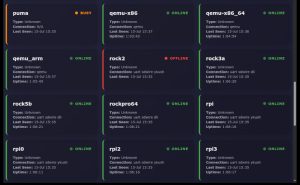
U-Boot has a new continuous integration (CI) lab page that provides a real-time look at the status of various development boards. The page, located at https://lab.u-boot.org/, offers a simple and clean interface that allows developers and curious people to quickly check on the health and activity of each board in the lab.

When you first visit the page, you’ll see a grid of all the available boards. Each board’s card displays its name and current status, making it easy to see which boards are online and which are not. A single click on any board will show a console view, taken from the last health check. This allows you see why boards are failing, for example.

This new lab page is a nice resource for the U-Boot community. It provides a transparent and accessible way to monitor this part of the CI system.

Check it out and get in touch if you have any suggestions or feedback! 🧪


Streamlining Emulation in U-Boot: A Kconfig Cleanup 🧹

In the world of software development, consistency is key. A recent update to U-Boot Concept takes a solid step in that direction by restructuring how it handles emulation targets. This change makes life easier for developers working across different processor architectures.

Previously there were inconsistencies in the configuration system (Kconfig). For example, enabling QEMU emulation for ARM systems used the ARCH_QEMU symbol, while x86 systems used VENDOR_EMULATION for a similar purpose. This could create confusion and added complexity when managing board configurations.

To resolve this, a new, architecture-neutral symbol, MACH_QEMU, has been introduced. This single, unified option replaces the separate symbols for both ARM and x86 emulation targets.

This small but important merge tidies up the codebase, creating a more consistent and intuitive developer experience. It also sets the stage for future work, with the potential to extend this unified approach to other architectures. It’s a great example of the continuous effort to keep U-Boot clean, efficient, and easy to maintain for everyone involved.


Booting into Linux in 100ms

A few weeks ago I took a look at Qboot, a minimal x86 firmware for QEMU which can boot in milliseconds. Qboot was written by Paolo Bonzini and dates from 2015 and there is an LWN article with the original announcement.

I tried it on my machine and it booted in QEMU (with kvm) in about 20ms, from entering Qboot to entering Linux. Very impressive! I was intrigued as to what makes it so fast.

There is another repo, qemu-boot-time by Stefan Garzarella, which provides an easy means to benchmark the boot. It uses perf events in Linux to detect the start and end of Qboot.

Using x86 post codes, I added the same to U-Boot. Initially the boot time was 2.9 seconds! Terrible. Here is a script which works on my machine and measures the time taken for U-Boot boot, using the qemu-x86_64 target:

It turned out that almost two of the seconds were the U-Boot boot delay. Another 800ms was the PXE menu delay. With those removed the time dropped to 210ms, which is not bad.

Using CONFIG_NO_NET dropping CONFIG_VIDEO each shaved off about 50ms. I then tried passing the kernel and initrd through QEMU using the QFW interface. It only saved 15ms but it is something.

I figured that command-line processing would be quite slow. With CONFIG_CMDLINE disabled another 5ms was saved. A final 7ms came from disabling filesystems and EFI loader. Small gains.

In the end, my result is about 83ms (in bold below):

$ ./contrib/qemu-boot-timer.sh
starting perf
building U-Boot
running U-Boot in QEMU
waiting for a bit
qemu-system-x86_64: terminating on signal 15 from pid 2775874 (bash)
parsing perf results
1) pid 2779434
qemu_init_end: 51.924873
u_boot_start: 51.962744 (+0.037871)
u_boot_do_boot: 134.781048 (+82.818304)

One final note: the qemu-x86_64 target actually boots by starting SPL in 16-bit mode and then moving to 64-bit mode to start U-Boot proper. This was partly to avoid calling 16-bit video ROMs from 64-bit code. Now that bochs is used for the display, it should be easy enough to drop SPL for this target. I’m not sure how much time that would save.

Note: Some final hacks are tagged here.