Dealing with test images

Testing boot scenarios in very important but there are quite a lot of them! Concept currently has about 13 images containing various partitions and files used by the bootstd tests. These are listed in test.dts, for example:

	aliases {
...
		mmc7 = "/mmc7";
		mmc8 = "/mmc8";
...
	};

	/* This is used for Android boot image v4 tests */
	mmc7 {
		status = "disabled";
		compatible = "sandbox,mmc";
		filename = "mmc7.img";
	};

	/* This is used for Android boot image v2 tests. */
	mmc8 {
		status = "disabled";
		compatible = "sandbox,mmc";
		filename = "mmc8.img";
	};

All images are built by test_ut_dm_init_bootstd(), but most of these are disabled by default, to avoid making sandbox unwieldy and confusing. It also means that a test only has to worry about its particular disk image (plus a few common ones) and doesn’t have to be be updated every time a new test case is added in the code base.

But sometimes it is useful to enable a particular image. Tests do this individually, by enabling a devicetree node and then binding a device to it. But there is no way to do this from the command line. The only way is to edit test.dts to remove the status = "disabled" line for a node.

Until now. A very simple addition to sandbox allows an image to be enabled from the command line: the sb devon command. Simply specify the device name (e.g. mmc11) and it will set up a device. From then on the device appears as normal, so it can be used with the bootflow command, ls, etc.

When you have finished with the device sb devoff disables it again, putting things back to normal. Here is an example:

=> mmc list
mmc2: 2 (SD)
mmc1: 1 (SD)
mmc0: 0 (SD)
=> ls mmc b:1
** Bad device specification mmc b **
Couldn't find partition mmc b:1
=>
=> sb devon mmc11
Device 'mmc11' enabled
=> mmc list
mmc2: 2 (SD)
mmc1: 1 (SD)
mmc0: 0 (SD)
mmc11: 11 (SD)
=> ls mmc b:1    
            extlinux/
        7   initrd.img-6.8.0-53-generic
     1620   vmlinuz-6.8.0-53-generic

2 file(s), 1 dir(s)

=> sb devoff mmc11
Device 'mmc11' disabled
=> mmc list       
mmc2: 2 (SD)
mmc1: 1 (SD)
mmc0: 0 (SD)
=> 

Give it a try!


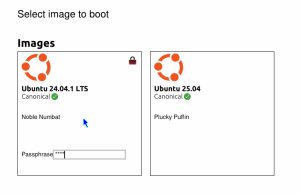
Unlocking Disks Earlier: Basic LUKS1 Support Arrives in U-Boot

A new 24-patch series in Concept that introduces basic support for unlocking LUKS1 encrypted partitions directly within U-Boot. This is a foundational step toward a more integrated and user-friendly full-disk encryption (FDE) experience.

🤔 The Problem with “Late” Unlocking

Traditionally, FDE on Linux systems is handled late in the boot process. U-Boot loads a kernel and an initial ramdisk (initramfs), and it’s the initramfs’s job to prompt the user for a passphrase and unlock the main root filesystem.

This common approach works, but it has several drawbacks:

  • Firmware is blind: U-Boot has no way of knowing if the boot will succeed until long after it has handed off control.
  • Confusing user experience: The passphrase prompt appears late in the boot sequence, sometimes after the vendor logo has disappeared.
  • No integrated UI: It’s not possible to create a single, polished firmware UI that handles both boot selection and disk decryption.
  • Inflexible for automation: In VM environments where a key might be known in advance, there’s no way for the firmware to use it, so the ramdisk must handle this through attestation, etc.
  • Ramdisk is required: You can’t boot from an encrypted disk unless you also use a ramdisk to perform the unlock.

đź’ˇ What’s New: The luks Command

This patch series takes a small step to improve this by bringing decryption capabilities into U-Boot itself. The new feature set is centered around the luks command, which allows U-Boot to interact with LUKS-encrypted partitions.

The command introduces three main subcommands:

  1. luks detect: Checks if a given partition is a valid LUKS device.
  2. luks info: Parses and displays the LUKS header metadata. This works for both LUKS1 and LUKS2 partitions, thanks to a new simple JSON parser included in the series for handling the LUKS2 header.
  3. luks unlock: unlocks a LUKS1 partition using a provided passphrase.

Here’s a look at it in action:

=> luks detect mmc 1:2
LUKS1 encrypted partition detected

=> luks info mmc 1:2
Version:         1
Cipher name:     aes
Cipher mode:     cbc-essiv:sha256
Hash spec:       sha256
Payload offset:  4096 sectors
Key bytes:       32

=> luks unlock mmc 1:2 mysecretpassphrase
Unlocked LUKS partition as blkmap device 'luks-mmc-1:2'
=>

🔓 Accessing Decrypted Data via blkmap

Once a partition is unlocked, how do you access the data? The luks unlock command integrates with U-Boot’s blkmap subsystem.

When a partition is successfully unlocked, a new virtual blkmap device is created. This device provides read-only access to the decrypted data on-the-fly.

This means you can now use standard U-Boot commands to read files directly from the encrypted partition, just as if it were a normal, unencrypted disk:

=> ls blkmap 0 /
          ./
          ../
          lost+found/
2481008   vmlinuz-6.8.0-53-generic
1616      initrd.img-6.8.0-53-generic

=> ext4load blkmap 0 ${kernel_addr_r} /vmlinuz-6.8.0-53-generic
2481008 bytes read in 64 ms (37.0 MiB/s)
=>

This simple feature allows U-Boot to load a kernel, read a configuration file, or access any other data from an encrypted volume before booting.

🛠️ Under the Hood: What Made This Possible

There is quite a bit of foundational work included in this series:

  • Crypto: The mbedtls library in U-Boot was enhanced to enable PKCS#5 (PBKDF2) functions, which are essential for deriving keys from passphrases in LUKS. A fix for AES-192 and AES-256 key-size handling was also included.
  • blkmap Enhancement: The blkmap driver was extended with a new blkmap_map_crypt() function to handle the on-the-fly decryption.
  • Testing: A large portion of the series is dedicated to building solid testing infrastructure. This includes updates to the Docker image, CI configuration and new Python test helpers (fs_helper.py) to create, encrypt, and test against real LUKS1 and LUKS2 disk images.

This series lays the groundwork for a more secure and streamlined boot process. While full LUKS2 unlock support and read-write access are topics for another day, this is a step forward.


Pass a boot command to QEMU!

The build-qemu script provides lots of useful features and is an easy way to run U-Boot under QEMU with an OS, with or without video, etc. Now in Concept it is possible to pass a boot command!

The -b/–bootcmd option creates a special ‘file’ within QEMU that contains the requested command. Then U-Boot uses an event in main.c to check for that file and read it. The command is then executed instead of the autoboot command. In effect, it provides a way to control what U-Boot does when it starts up.

Possible uses may include setting the bootmeth order to boot using extlinux instead of EFI.

Note that this does not affect the preboot command.

The main patch is the addition of a new EVT_BOOTCMD event which is emitted in main_loop() before starting the main CLI loop. Under the hood, QEMU provides the information in its internal filesystem, the the opt/u-boot/bootcmd file. You can see this using the ‘qfw’ command:

$ ./scripts/build-qemu -a x86 -rs -b 'echo hi'

U-Boot Concept SPL 2025.10
Trying to boot from SPI


U-Boot Concept 2025.10

CPU:   QEMU Virtual CPU version 2.5+
DRAM:  512 MiB
Core:  19 devices, 12 uclasses, devicetree: separate
Loading Environment from FAT... ** Bad device specification virtio 0 **
Model: QEMU x86 (Q35)
Net:   eth0: virtio-net#0

Hit any key to stop autoboot:  0 
hi
=> qfw list
    Addr     Size Sel Name
-------- -------- --- ------------
       0        0  20 bios-geometry                                           
       0        0  21 bootorder                                               
1ec21000       14  22 etc/acpi/rsdp                                           
1ec21040    20000  23 etc/acpi/tables                                         
       0        4  24 etc/boot-fail-wait                                      
       0       28  25 etc/e820                                                
       0       18  26 etc/smbios/smbios-anchor                                
       0      13b  27 etc/smbios/smbios-tables                                
       0        1  28 etc/smi/features-ok                                     
       0        8  29 etc/smi/requested-features                              
       0        8  2a etc/smi/supported-features                              
       0        6  2b etc/system-states                                       
       0     1000  2c etc/table-loader                                        
       0        0  2d etc/tpm/log                                             
       0     2400  2e genroms/kvmvapic.bin                                    
       0        7  2f opt/u-boot/bootcmd                                      
=> 

For now this option is only supported on x86, but ARM support should land in the next few weeks.

The build-efi script also supports this option for the app, but it is implemented in a completely different way. It creates an environment file on the FAT filesystem which U-Boot can read when it starts up. A later series provides this feature which is has also landed in Concept.

The ability to pass information from the host is a useful feature in QEMU. Keep it in mind if you are working in an emulation environment!


ACPI Firmware Performance Data Table

U-Boot Concept now has preliminary support for the ACPI Firmware Performance Data Table (FPDT). It is included in the ‘bootstage and script enhancement’ series. The OS can look at this table to figure out how long the firmware took to boot.

Only the ‘basic boot’ record is supported. It contains the following fields:

  • reset_end – Timestamp for the end of reset. This is set to the timestamp when U-Boot starts, or strictly speaking, when it sets up bootstage.
  • loader_start – Timestamp for when U-Boot starts loading the OS (not supported)
  • loader_exec – Timestamp for when U-Boot starts OS execution. This presupposes the EFI loader, i.e. starting the OS does not actually mean that U-Boot is finished. For now this is not supported.
  • ebs_entry – Timestamp for when the OS (or EFI app) calls exit-boot-services (not supported)
  • ebs_exit – Timestamp for when U-Boot completes the exit-boot-services call (not supported)

All timestamps are 64-bit values in microseconds with 0 assumes to be the end of the reset signal.

As you can see from the above, most of the fields are not currently filled in. Further work will be needed to plumb this into U-Boot’s EFI loader. As with the BGRT (blog link) the FPDT is added to the ACPI tables provided by QEMU, when running under emulation.


Some thoughts on Claude

I’ve been experimenting with AI coding tools, mostly Claude, for the last few months. Here are some thoughts on my experience so far.

Things I have tried

So far I have tried using Claude for many different tasks:

  • Solving a coding problem, such as creating a Python script to scan header files
  • Writing tests for existing code
  • Checking patches before I send them
  • Writing drafts for blog posts
  • Figuring out bugs
  • Adjusting code to make tests pass

First, a caveat. I am a beginner at using this technology and do not spend much time following leaders in this space. I started using Claude based on a family recommendation and am far from being any sort of expert.

The good

When I first tried out creating a new command in Claude, it produced code which compiled and looked like U-Boot code. This seemed quite magical to me and i left the computer with a feeling of awe and bewilderment. I have a basic understanding of how AI operates but it is amazing to see it producing code like this. Also the inference is very fast, sometimes producing hundreds of lines of code in a minute or less.

Claude works within your project directory. It can read and write commits, run tests, etc. For a code base like U-Boot with lots of tests, it is relatively easy to get it to make changes while ensuring that the tests still pass. It can execute most commands that you can. It asks first but you can add rules to a JSON file to give it permission to run things itself.

In most cases, Claude is able to solve the problem. For example, I wanted to build U-Boot as a library. I actually had some old patches for this, but I decided to give the task to Claude. I provided a lot of guidance on exactly how it should work, but Claude figured out the Makefile rules, iterating until things worked and fixing bugs that I found. I was able to make changes myself, tell Claude and it would build on them.

The easiest tasks for Claude are to extend an existing feature and the associated tests. The hardest are to refactor code in non-trivial ways.

One interesting case where Claude does well is dealing with conflicts when rebasing a series or applying patches. I have only tried this a few times but it has not made any mistakes yet. It is fairly slow, though.

The bad

Claude is a long way from perfect. It feels to me like a very junior but knowledgeable software engineer. It happily writes 600 lines of code when 300 would do. For larger tasks, the code feels extremely ‘flabby’ and a bit painful to read. Variables names are too long. Useless comments are added to obvious code. It happily creates highly redundant code instead of setting up a helper function first.

But with all of these problems, you can guide it to perform better. You can review the code and ask it to make changes and it happily does so. It might not be able to conceive of a refactoring that would improve code, but it can execute it.

For one tasks, Claude was able to create a 1200-line Python script in about an hour (with lots of prompting, etc.) that would have likely taken me 1-2 days (it is hard to be sure, since I didn’t do it). I then spent about 6 hours refacoring and rewriting the script after which I felt that the code wasn’t too bad. The end result was likely not as good as I would have done if I had written it myself from scratch, but it was fine.

Sometimes Claude gets stuck. It tends to happen when I am trying to get it to do something I’m not to sure about. It sometimes just gets the wrong end of the stick, or solves a slightly different problem. This is most common when first firing it up. After a bit of back and forth it settles in and makes progress

The ugly

What is Claude bad at? When running programs it can see the console output, but it cannot interact with the program, or at least I’m not sure how to make it do that. So for example it can run U-Boot sandbox with a timeout and it can even pass it commands to run. But it doesn’t know how to ‘type’ commands interactively.

Claude can sometimes change the test to fit the code, when the tasks was to fix the code. It tends to write non-deterministic tests, such as asserting that an integer is greater than zero, rather than checking for an exact value.

Claude can produce commit messages. It tends to be verbose by default but you can ask it to be brief. But I have not had much success in getting Claude to create its own commits after making a whole lot of changes.

Getting things done can sometimes just be very slow. I have not really compared the time to create high-quality, finished patches myself versus with Claude. That is something I must try, now that I am learning more about it.

My workflow

How do I actually use Claude? Well, first I figure out a design for what I want to do, typically a diagram or some notes. Then I ask Claude to perform an initial change to make a start. Then I build on that piece by piece until I have something working. I have not tried giving it a large challenge.

In some cases I create commits as I go, or even ask Claude to do this, but mostly I just create the whole thing and then manually build the commits afterwards. For code that Claude created in whole or part I add a Co-developed-by tag.

Breaking things into chunks saves time, I think. Cleaning up hundreds of lines of AI-generated code is very time-consuming and tedious. It is easier to tweak it a bit as I go.

A note on Gemini

I have tried Gemini CLI and sadly so far it has not been useful except in a few small areas. It is quite slow and seems to go into the weeds with any sort of moderate challenge. I expect this to change rapidly, so I keep trying it every now and then. I also use Gemini to create most of the featured images.

I have not tried OpenAI so far.

What do you think?

Leave a message in the comments if you have any thoughts or suggestions!


New video command and unified embedded image handling

U-Boot has long supported embedding a graphical image directly into the binary – like the boot logo and the recently added BGRT (Boot Graphics Resource Table) image for EFI systems. But the way these images were handled was a bit of a mixed bag, with different patterns for different images and custom boilerplate for each one.

A new 6-patch series cleans this up, introducing a unified infrastructure for embedded images along with new commands to work with them.

What’s new

Unified image infrastructure

Previously, images were handled through ad-hoc Makefile rules that looked for specific patterns like _logo.bmp or _image.bmp. Each image required custom accessor macros and boilerplate code.

The new approach moves all embedded images into a single drivers/video/images/ directory and automatically generates linker list entries for them. This makes it trivial to add new images – just add obj-y += myimage.o to the Makefile and reference it using video_image_get(myimage, &size) or video_image_getptr(myimage).

The linker list infrastructure ensures that all images are discoverable at runtime, which enables the new video images command described below.

New video command

A new video command has been added with four subcommands:

  • video setcursor <col> <row> – Set cursor position (equivalent to existing setcurs command)
  • video puts <string> – Write string at current position (equivalent to existing lcdputs command)
  • video write -p [<col>:<row> <string>...] – Write string at a given position, either a character or a pixel position
  • video images – List all images compiled into U-Boot

The existing standalone setcurs and lcdputs commands remain available for backward compatibility.

Example usage

=> video images
Name                       Size
-------------------- ----------
bgrt                      43926
u_boot                     6932

Total images: 2

=> video setcursor 10 5
=> video puts "Hello U-Boot!"
=> video write -p a3:34 "Pixels"

The payoff

This series removes 46 lines of duplicate accessor code while adding about 500 lines total (mostly documentation and tests). But the real win is in maintainability:

  • Simpler to extend: Adding a new embedded image now requires just a single line in a Makefile
  • Discoverable: The video images command shows what’s available at runtime
  • Better organized: All images live in drivers/video/images/ rather than scattered across the tree
  • Consistent API: One pair of macros works for all images

The series also brings comprehensive documentation for the video commands (which previously had none) and adds tests to ensure everything works correctly.

If you’ve ever wanted to add a custom boot logo or wondered what images are built into your U-Boot binary, this series makes both much easier!


Enhancing EFI Boot and Developer Experience

We’ve just rolled out a series of updates aimed at improving the U-Boot EFI application, with a special focus on streamlining the testing and debugging process, particularly for ARM platforms. This batch of 24 patches introduces several quality-of-life improvements, from better debugging tools to more robust boot procedures. Let’s dive into the key changes.


Streamlining the Boot Process with ‘Fake Go’ 🚀

One of the standout features in this release is the introduction of a ‘fake go’ option for the boot process. Previously available only for tracing, this feature is now a standalone debugging tool enabled by CONFIG_BOOTM_FAKE_GO.

When you initiate a boot with the ‘fake go’ flag (e.g., bootflow boot -f or bootm fake), U-Boot performs all the necessary steps to prepare for booting an OS—loading the kernel, setting up the device tree, and preparing memory—but stops just short of jumping to the OS. This allows you to inspect the system’s state at the final moment before handoff, which is invaluable for debugging complex boot issues without needing a full OS boot cycle.


Pager Improvements for Better Interaction đź“„

The console pager is a useful tool, but it can be cumbersome when you’re working without a serial console or need to quickly bypass lengthy output. We’ve introduced two new ways to control the pager on the fly:

  • Quit and Suppress (q): Pressing q at the pager prompt will now immediately stop all further output for the current command. This is perfect for when you’ve seen what you need and want to return to the prompt without sitting through pages of text.
  • Bypass Session (Q): Pressing Q will put the pager into bypass mode for the rest of your U-Boot session, allowing all subsequent commands to print their full output without interruption.

These small changes make console interaction much more fluid and give you greater control over command output.


Key Fixes and Enhancements 🛠️

Alongside these major features, this series includes a number of other smaller updates:

  • Safer Image Relocation on ARM: We’ve improved how kernel images are relocated on ARM. Instead of moving the image to a static offset, which could risk overwriting other critical data like the device tree, U-Boot now uses the LMB (Logical Memory Block) library to safely allocate a new, unused region of memory.
  • Improved Debugging Output: We’ve added more detailed debug messages throughout the boot process, especially in FIT image handling and device tree selection, making it easier to trace the boot flow and diagnose issues.
  • Cleaner ATAGs Messaging: The often-confusing “FDT and ATAGS support not compiled in” error has been clarified. U-Boot will now correctly report when a device tree is missing, preventing developers from going down the wrong path when debugging.
  • CI and Build Fixes: A few patches have been included to fix a bug in our automated release script that was causing CI failures, ensuring our development and release processes remain smooth.

These updates continue the development of the EFI app, while benefiting others boards as well.


Automating the U-Boot Concept Release Cycle


U-Boot Concept releases provide regular, time-based snapshots of our development progress, offering a stable point for users and developers. Up until recently, creating these releases involved a series of manual steps that were time-consuming and prone to human error.

To improve this process, we’re happy to announce a new, fully automated release workflow for U-Boot Concept. This system uses GitLab CI/CD and a custom Python script to handle the entire release process, from version calculation to final tagging, ensuring consistency and reliability.


A Predictable Schedule

The automation is built around a strict, predictable schedule that defines when final and release candidate (RC) versions are created. This removes any ambiguity about when to expect a new release.

  • Final Releases: Occur on the first Monday of every even-numbered month (February, April, June, August, October, December). The version number corresponds to the year and month, such as 2025.10.
  • Release Candidates (RCs): A series of three release candidates are created every two weeks leading up to a final release:

    • rc1: 6 weeks before the final release.
    • rc2: 4 weeks before the final release.
    • rc3: 2 weeks before the final release.

  • Dead Period: The time between a final release and the next rc1 is considered a “dead period” where no automated releases occur. This provides a development window before the next stabilization cycle begins.

The Automation in Action

The entire process is managed by a scheduled GitLab CI/CD pipeline that runs periodically to check if a release is due. Here’s a step-by-step look at what happens on a release day:

  1. Date Check & Version Calculation: The pipeline executes a Python script (scripts/release_version.py), which acts as the brains of the operation. The script checks the current date against the release schedule. If it’s not a designated release Monday, the job simply exits.
  2. Makefile Version Bump: If it is a release day, the script calculates the new version (e.g., 2025.12-rc1) and automatically updates the VERSION, PATCHLEVEL, and EXTRAVERSION variables in the project’s Makefile.
  3. Automated Commit: The CI job commits the modified Makefile directly to the master branch with a standardized message, such as chore: Bump version for release candidate 2025.12-rc1.
  4. Documentation Update: The script then updates the release history in doc/develop/concept_releases.rst, adding an entry for the new version along with the corresponding commit SHA. It also intelligently updates the “Next Release” section to show the schedule for the upcoming final release. This change is also committed and pushed automatically.
  5. Tag and Release: Finally, the pipeline uses the official release-cli tool to create a formal Git tag (e.g., c2025.12-rc1) and a corresponding GitLab Release. This provides a clear, permanent marker for the release, complete with a title and description. The ‘c’ prefix makes it clear that this is a Concept release, not the main tree.

Benefits of Automation

This new workflow brings several key advantages to the U-Boot Concept project:

  • Consistency: Every release is generated using the exact same procedure, ensuring uniformity.
  • Reliability: The risk of human error—like typos in version numbers or forgetting a step—is eliminated.
  • Transparency: The entire process is defined in code, and the release history is now automatically documented and kept up-to-date for everyone to see.
  • Efficiency: Developer time is freed from the manual chores of release management, allowing more focus on development and innovation.

This move to an automated system marks a significant step in improving our release management and ensuring that U-Boot Concept remains a dependable and predictable development platform.


A Cursor Comes to the U-Boot Console

For a long time, editing commands in the U-Boot video console has been an exercise in memory. Without a visible cursor, it was often difficult to know your exact position in a long command line. A new 41-patch series in Concept changes that by introducing comprehensive cursor support for U-Boot’s video consoles.

This update brings a familiar (but so far non-blinking!) cursor to the command line, making editing commands a much more intuitive process.

How It Works

The new cursor functionality is designed to be efficient and visually clean.

  • Idle Display: The cursor is only drawn when U-Boot is idle and waiting for input. As soon as you begin typing or a command is executed, the cursor is hidden.
  • Save and Restore: To prevent visual artifacts, the video driver now saves the framebuffer pixels that are underneath the cursor’s position before it is drawn. When the cursor needs to be hidden, these saved pixels are restored, ensuring that the original display content is perfectly preserved.
  • Broad Support: This functionality is not limited to one type of console. The new cursor is supported on both the standard bitmap-font console (console_normal) and the more advanced console_truetype.

Related Improvements

This series goes beyond just adding a cursor and includes several related enhancements that improve the overall console experience:

  • Truetype Console Upgrades: The truetype console receives two major improvements. First, it can now render standard bitmap fonts, making it more versatile. Second, a long-standing issue has been fixed where using arrow keys to edit commands would corrupt the displayed text. Command-line editing with truetype fonts is now much more reliable.
  • Expo on Standard Consoles: The expo toolkit’s line-editing feature, previously dependent on the truetype console, now works with the standard bitmap-font console as well. This is made possible by the new console state-tracking implemented for the cursor.
  • Thoroughly Tested: The series includes a new set of tests specifically for the cursor functionality, verifying backspace behavior and ensuring there are no visual artifacts left behind after editing.

This work represents a significant quality-of-life improvement for anyone who works regularly with the U-Boot command line without a serial UART. To enable it on your board, simply add CONFIG_CURSOR=y to your configuration.


Mouse and Touchpad Support Added to Expo

U-Boot’s ‘expo’ toolkit is used for creating user interfaces, such as the configuration editor (cedit) and graphical boot menus (bootflow menu). Previously, user interaction with expo scenes was limited to the keyboard.

A recent 23-patch series introduces support for mouse and touchpad interaction.

New Input Handling

For devices where a mouse or touchpad is available, keyboard-only navigation can be inefficient. This update is intended to improve user interaction, particularly within complex screens like the configuration editor.

The core of this update is a new expo_send_click() function, which is designed to work similarly to the existing expo_send_key() function for processing user input.

The expo framework separates the processing of an event (like a click or keypress) from the handling of the resulting action. This series maintains that design, which allows expo to be integrated into different event loops. If a mouse is detected, expo will enable it by default.

Implementation Details

To enable mouse clicks, the framework required a method to determine which UI element exists at a specific (x, y) coordinate. This was implemented in several stages:

  1. Coordinate Checking: New functions, such as scene_menu_within() and scene_textline_within(), have been added. These check if a given coordinate is within the bounding box of a menu item or an editable text field.
  2. Scene-Level Clicks: The logic was then extended to the scene level, allowing a click to be routed to the correct object within the current scene. This includes handling for popup menus.
  3. Input Polling: The main expo_poll() function was updated to check for both keyboard and mouse events.

Additional Changes

The series also includes a few other updates:

  • Filled Boxes: The video API now supports drawing filled rectangles in addition to outlines.
  • New Fonts: The Ubuntu Light and Bold fonts have been added.
  • Testing: New tests for the mouse functionality have been added, including helpers to simulate clicks and verify the resulting actions.

This series expands U-Boot’s user interface capabilities by adding a new method for user input.